DEMO1
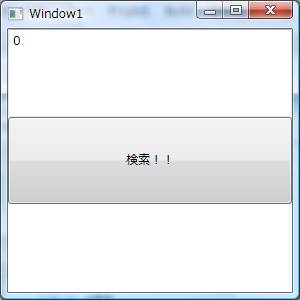
<Window x:Class="WpfApplication1.Window1" xmlns="http://schemas.microsoft.com/winfx/2006/xaml/presentation" xmlns:x="http://schemas.microsoft.com/winfx/2006/xaml" xmlns:WpfApplication1="clr-namespace:WpfApplication1;assembly=" Title="Window1" Height="300" Width="300"> <Window.DataContext> <WpfApplication1:DocumentA /> </Window.DataContext> <Grid> <Grid.RowDefinitions> <RowDefinition /> <RowDefinition /> <RowDefinition /> </Grid.RowDefinitions> <TextBox Text="{Binding Path=検索値}"/> <Button Content="検索!!" Click="検索" Grid.Row="1"/> <Label Content="{Binding Path=検索結果}" Grid.Row="2"/> </Grid> </Window> 




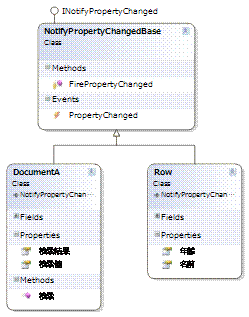
public void 検索()
{
var rows = new Row[] {
new Row(){名前 = "えムナウ",年齢 = 18},
new Row(){名前 = "R田中",年齢 = 21},
new Row(){名前 = "中博俊",年齢 = 31}};
var 結果 =
(from x in rows
where x.年齢 > this.検索値
select x).FirstOrDefault();
this.検索結果 = string.Format("{0}様 {1}歳", 結果.名前,結果.年齢);
}
DEMO2
コンバータを作る
public class RowToStringConverter : IValueConverter
{
#region IValueConverter Members
public object Convert(object value, Type targetType, object parameter, System.Globalization.CultureInfo culture)
{
if (value == null) {return DependencyProperty.UnsetValue; }
Row 結果 = (Row) value;
return string.Format("{0}様 {1}歳", 結果.名前,結果.年齢);
}
public object ConvertBack(object value, Type targetType, object parameter, System.Globalization.CultureInfo culture)
{
throw new NotImplementedException();
}
#endregion
}
既存コードを編集する
public Row _検索結果;
public Row 検索結果 { get { return _検索結果; } set { _検索結果 = value; this.FirePropertyChanged("検索結果"); } }
this.検索結果 = 結果;
XAMLにコンバータを組み込む
<Window x:Class="WpfApplication1.Window1"
xmlns="http://schemas.microsoft.com/winfx/2006/xaml/presentation"
xmlns:x="http://schemas.microsoft.com/winfx/2006/xaml"
xmlns:WpfApplication1="clr-namespace:WpfApplication1;assembly="
Title="Window1" Height="300" Width="300">
<Window.DataContext>
<WpfApplication1:DocumentA />
</Window.DataContext>
<Window.Resources>
<WpfApplication1:RowToStringConverter x:Key="RowToStringConverter" />
</Window.Resources>
<Grid>
<Grid.RowDefinitions>
<RowDefinition />
<RowDefinition />
<RowDefinition />
</Grid.RowDefinitions>
<TextBox Text="{Binding Path=検索値}"/>
<Button Content="検索!!" Click="検索" Grid.Row="1"/>
<Label Content="{Binding Path=検索結果, Converter={StaticResource RowToStringConverter}}" Grid.Row="2"/>
</Grid>
</Window>
実行
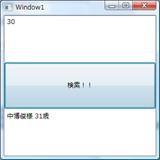
拍手!!
DEMO2-2
<Grid>
<Grid.RowDefinitions>
<RowDefinition />
<RowDefinition />
<RowDefinition />
<RowDefinition />
</Grid.RowDefinitions>
<TextBox Text="{Binding Path=検索値}"/>
<Button Content="検索!!" Click="検索" Grid.Row="1"/>
<Label Content="{Binding Path=検索結果, Converter={StaticResource RowToStringConverter}}" Grid.Row="2"/>
<Label Content="{Binding Path=検索結果.年齢}" Grid.Row="3"/>
</Grid>
DEMO3
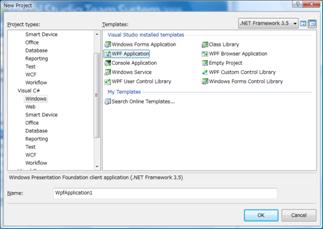
<Window x:Class="WpfApplication1.Window1"
xmlns="http://schemas.microsoft.com/winfx/2006/xaml/presentation"
xmlns:x="http://schemas.microsoft.com/winfx/2006/xaml"
Title="Window1" Height="300" Width="300" FontSize="48">
<Grid>
<WrapPanel>
<RadioButton Content="大阪" />
<RadioButton Content="兵庫" />
<RadioButton Content="京都" />
</WrapPanel>
</Grid>
</Window>
実行はい終わりです。

最低限のパネルに収まる場合にはパネル内がグループ単位になるようです。
では
<Window x:Class="WpfApplication1.Window1"
xmlns="http://schemas.microsoft.com/winfx/2006/xaml/presentation"
xmlns:x="http://schemas.microsoft.com/winfx/2006/xaml"
Title="Window1" Height="300" Width="300" FontSize="48">
<Grid>
<StackPanel>
<WrapPanel>
<RadioButton Content="大阪" />
<RadioButton Content="兵庫" />
<RadioButton Content="京都" />
</WrapPanel>
<WrapPanel>
<RadioButton Content="奈良" />
<RadioButton Content="和歌山" />
<RadioButton Content="滋賀" />
</WrapPanel>
</StackPanel>
</Grid>
</Window>
実行
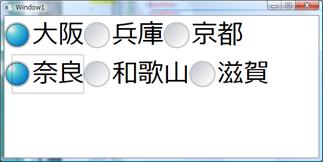
まずいですね。
<Window x:Class="WpfApplication1.Window1"
xmlns="http://schemas.microsoft.com/winfx/2006/xaml/presentation"
xmlns:x="http://schemas.microsoft.com/winfx/2006/xaml"
Title="Window1" Height="300" Width="300" FontSize="48">
<Grid>
<StackPanel>
<WrapPanel>
<RadioButton Content="大阪" GroupName="Pref"/>
<RadioButton Content="兵庫" GroupName="Pref" />
<RadioButton Content="京都" GroupName="Pref" />
</WrapPanel>
<WrapPanel>
<RadioButton Content="奈良" GroupName="Pref" />
<RadioButton Content="和歌山" GroupName="Pref" />
<RadioButton Content="滋賀" GroupName="Pref" />
</WrapPanel>
</StackPanel>
</Grid>
</Window>
これでOKです。
ちょっと今回の範囲ではないですが、UserControlを作ってみましょう。
<UserControl x:Class="WpfApplication1.UserControl1"
xmlns="http://schemas.microsoft.com/winfx/2006/xaml/presentation"
xmlns:x="http://schemas.microsoft.com/winfx/2006/xaml"
Height="300" Width="300">
<Grid>
<StackPanel>
<WrapPanel>
<RadioButton Content="大阪" GroupName="Pref"/>
<RadioButton Content="兵庫" GroupName="Pref" />
<RadioButton Content="京都" GroupName="Pref" />
</WrapPanel>
<WrapPanel>
<RadioButton Content="奈良" GroupName="Pref" />
<RadioButton Content="和歌山" GroupName="Pref" />
<RadioButton Content="滋賀" GroupName="Pref" />
</WrapPanel>
</StackPanel>
</Grid>
</UserControl>
これをWindow側に2つ張り付ける
<Window x:Class="WpfApplication1.Window1"
xmlns="http://schemas.microsoft.com/winfx/2006/xaml/presentation"
xmlns:x="http://schemas.microsoft.com/winfx/2006/xaml"
xmlns:WpfApplication1="clr-namespace:WpfApplication1;assembly="
Title="Window1" Height="300" Width="300" FontSize="48">
<Grid>
<StackPanel>
<WpfApplication1:UserControl1 />
<WpfApplication1:UserControl1 />
</StackPanel>
</Grid>
</Window>
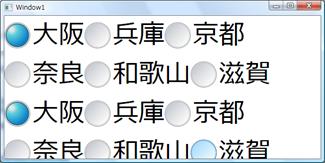
実行
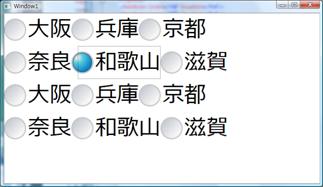
かなりひどい感じになります。
DEMO4
まず継承ラジオボタンを作成します。
using System;
using System.Windows.Controls;
namespace demo3
{
public class WankumaRadioButton : RadioButton
{
public WankumaRadioButton ()
{
this.GroupName = Guid.NewGuid().ToString();
}
}
}
UserControlのRadioButtonを置き換えます。
GroupNameはXAML側で設定すると、そちらが有効になるので消します。
<UserControl x:Class="demo3.UserControl1"
xmlns="http://schemas.microsoft.com/winfx/2006/xaml/presentation"
xmlns:x="http://schemas.microsoft.com/winfx/2006/xaml"
xmlns:demo3="clr-namespace:demo3;assembly="
>
<Grid>
<StackPanel>
<WrapPanel>
<demo3:WankumaRadioButton Content="大阪" />
<demo3:WankumaRadioButton Content="兵庫" />
<demo3:WankumaRadioButton Content="京都" />
</WrapPanel>
<WrapPanel>
<demo3:WankumaRadioButton Content="奈良" />
<demo3:WankumaRadioButton Content="和歌山" />
<demo3:WankumaRadioButton Content="滋賀" />
</WrapPanel>
</StackPanel>
</Grid>
</UserControl>
とりあえず実行
これで全部が独立しました
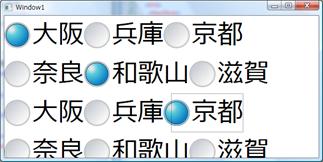
ドキュメントクラスを3段構えで用意します。
using System.ComponentModel;
namespace demo3
{
public enum 関西
{
大阪, 奈良, 兵庫, 京都, 和歌山, 滋賀
}
public class DocumentRadio : NotifyPropertyChangedBase
{
private 関西 _Value; public 関西 Value { get { return _Value; }
set { _Value = value; this.FirePropertyChanged("Value"); } }
}
public class DocumentB : NotifyPropertyChangedBase
{
private DocumentRadio _ValA = new DocumentRadio();
public DocumentRadio ValA { get { return _ValA; }
set { _ValA = value; this.FirePropertyChanged("Value"); } }
private DocumentRadio _ValB = new DocumentRadio();
public DocumentRadio ValB { get { return _ValB; }
set { _ValB = value; this.FirePropertyChanged("ValB"); } }
}
}
WindowのXAMLを編集します
<Window x:Class="demo3.Window1"
xmlns="http://schemas.microsoft.com/winfx/2006/xaml/presentation"
xmlns:x="http://schemas.microsoft.com/winfx/2006/xaml"
xmlns:demo3="clr-namespace:demo3;assembly="
Title="Window1" Height="300" Width="600" FontSize="48">
<Window.DataContext>
<demo3:DocumentB />
</Window.DataContext>
<Grid>
<StackPanel>
<demo3:UserControl1 DataContext="{Binding Path=ValA}" />
<demo3:UserControl1 DataContext="{Binding Path=ValB}" />
</StackPanel>
</Grid>
</Window>
EnumBooleanConverterを作成します。
using System;
using System.Globalization;
using System.Windows;
using System.Windows.Data;
namespace demo3
{
/// <summary>
/// Enumをラジオボタンなどに関連付けるためのコンバータ
/// </summary>
public class EnumBooleanConverter : IValueConverter
{
public object Convert(object value, Type targetType, object parameter, CultureInfo culture)
{
//パラメータはstringのみ
string ParameterString = parameter as string;
if (ParameterString == null) { return DependencyProperty.UnsetValue; }
//valueが型の中身か
if (Enum.IsDefined(value.GetType(), value) == false) {
return DependencyProperty.UnsetValue; }
object paramvalue = Enum.Parse(value.GetType(), ParameterString);
if (paramvalue.Equals(value)) { return true; }
else { return false; }
}
public object ConvertBack(object value, Type targetType, object parameter, CultureInfo culture)
{
//パラメータはstringのみ
string ParameterString = parameter as string;
if (ParameterString == null) {
return DependencyProperty.UnsetValue;
}
//ターゲットタイプがnullの場合には何も返さない
if (targetType == null) {
return DependencyProperty.UnsetValue;
}
if (value is bool && ((bool)value) == true) {
return Enum.Parse(targetType, ParameterString);
} else {
return DependencyProperty.UnsetValue;
UserControlのバインディングを変更します。
<UserControl.Resources>
<demo3:EnumBooleanConverter x:Key="EnumBooleanConverter" />
</UserControl.Resources>
<demo3:WankumaRadioButton Content="大阪" IsChecked="{Binding Path=Value, Converter={StaticResource EnumBooleanConverter},ConverterParameter=大阪}"/>
実行